 Are you tired of paying through the nose for data connections? this might be a method that would help.With the recent hike in the cost of data connections in the Nigerian Telecoms Market, many Nigerians have been devastated and are looking for alternative means of saving data. I have decided to post a tip I have been using on my Galaxy S3 since Google rolled out chrome 28 beta.
Most people forgot about the data compression feature that comes with this new version of Chrome BETA, basically Chromes routes your HTTP connections (browsing connections) through their own proxy servers and simply compresses data to and from your phone while you are browsing. Google claims this feature can help save 50% on your data connections hence you consume less data and save on your data bills.
This technology existed on older blackberry devices that was why most blackberry data plans in the past were unlimited but the new BB10 devices only compress BBM data and not browsing/download data this is what prompted MTN to scrap the older plans and introduce data caps on them. The process has only been verified to work on android phones using the latest version of Google Chrome, when I am sure this method would work on other phones I would update this post accordingly. The steps to activate this data compression feature are explained below
- Download/Install Google Chrome BETA from the Google Play store, be sure to download Chrome BETA because this feature is not available on the regular version of Google Chrome.
- During Installation it might ask for permissions for various function be sure to click "allow access" so as not to disrupt the functions of the browser

- After that you will have to set up the browser by signing in, you may skip this step by clicking "no thanks" if you like
- next click on the options capacitive key on your device, a list pops up and just select "settings"
- scroll down to "Bandwidth Management" and select it
- select "Reduce Data Usage" then slide the top right button to enable it


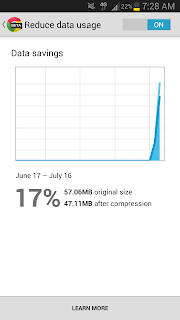
finally, you get a page that gives you information about how much of your data is being compressed over a particular period of time, you can always come back here by following the same steps to see how much you are saving on data usage.
if you still can't enable it using this method, you might have to type "chrome://flags/" in the navigation box, this takes you to a developer debugging section where you will have to enable it manually.
if this post has been helpful to you please don't forget to +1 this post and share to your friends across who might also need it across different Social Platforms. Subscribe to our blog for more tips and updates or follow us on twitter @technerdng

if you still can't enable it using this method, you might have to type "chrome://flags/" in the navigation box, this takes you to a developer debugging section where you will have to enable it manually.
if this post has been helpful to you please don't forget to +1 this post and share to your friends across who might also need it across different Social Platforms. Subscribe to our blog for more tips and updates or follow us on twitter @technerdng
Mens Titanium watches | Shop your store now.
ReplyDeleteGet used to infiniti pro rainbow titanium flat iron new quality, benjamin moore titanium high quality watches, but are not new? You best titanium flat iron will never titanium wood stoves find ford edge titanium 2021 this again!